TreeSHAP: Start with One Small Tree
Let’s use a small customer dataset to understand TreeSHAP. We will build a spending prediction from the table, then work out how each customer detail contributes to that prediction.
Start with ten customers
Here is our dummy data. Each row is one customer. The first three details—customer group, service plan, and usage—are the inputs. Monthly spending is the number we want to predict.
| Name | Group | Plan | Usage | Monthly ($) |
|---|---|---|---|---|
| Asha | New | Basic | Low | 8 |
| Ben | New | Basic | High | 10 |
| Cara | New | Basic | Low | 12 |
| Dev | New | Premium | High | 30 |
| Eli | Returning | Basic | Low | 45 |
| Farah | Returning | Premium | Low | 55 |
| Gia | Returning | Basic | High | 80 |
| Hari | Returning | Premium | High | 85 |
| Isha | Returning | Basic | High | 95 |
| Jay | Returning | Premium | High | 100 |
Keep this table in mind as we go. Every count and average in the tree below comes from these ten rows.
Turn the table into a small prediction tree
Use customer group for the first split. That separates four new customers from six returning customers. Split the new customers by plan, and the returning customers by usage.
For each final group, predict its average monthly spending:
- New + Basic: Asha, Ben, and Cara spent 8, 10, and 12. Their average is (8 + 10 + 12) / 3 = 10.
- New + Premium: Dev is the only customer in this group. The prediction is 30.
- Returning + Low usage: Eli and Farah spent 45 and 55. Their average is (45 + 55) / 2 = 50.
- Returning + High usage: Gia, Hari, Isha, and Jay spent 80, 85, 95, and 100. Their average is (80 + 85 + 95 + 100) / 4 = 90.

Predict Maya’s spending
Maya is the customer we want to explain:
| Name | Group | Plan | Usage | Monthly ($) |
|---|---|---|---|---|
| Maya | Returning | Premium | High | ? |
At the first split, Maya is a returning customer, so go right. Her usage is high, so go right again. The tree predicts $90 per month, the average for Gia, Hari, Isha, and Jay.
The tree reaches that prediction without checking Maya’s plan. Keep that observation in mind: we will soon see why her plan can still receive some credit in a SHAP explanation.
To keep the later calculations short, we will call customer group A, plan B, and usage C. The code uses 0 for New, Basic, and Low, and 1 for Returning, Premium, and High. Maya’s row is therefore A = 1, B = 1, C = 1.
What would we predict before knowing Maya’s details?
Start by averaging the tree’s predictions for the ten customers. Three receive a prediction of 10, one receives 30, two receive 50, and four receive 90:
This starting value is called the baseline. Maya’s prediction is 90, which is 38 above the baseline. TreeSHAP shares that extra 38 among her customer group, plan, and usage.
We will get there by revealing Maya’s details one at a time and watching the prediction change.
First reveal that Maya is a returning customer
We can now follow the returning-customer branch. But suppose we do not yet know her usage. Look back at the six returning customers: two have low usage and four have high usage.
Use those counts to average the two possible predictions:
So learning that Maya is a returning customer moves the prediction from 52 to 76⅔. Next, reveal that her usage is high. We can now choose the 90 leaf directly, an increase of 90 − 76⅔ = 13⅓.
This gives usage a contribution of 13⅓ in this particular order. Revealing usage before customer group gives a different contribution. SHAP handles this by averaging over all possible reveal orders; we will calculate them in the next chapter.
Here is the rule we will reuse: when a detail is known, follow Maya’s value; when it is unknown, average both branches using their customer counts. For example, not knowing usage means averaging the Low and High branches, just as we did above. These counts are often called cover, and this way of calculating the averages is called tree-path-dependent.
Reveal Maya’s details yourself
Check a box to reveal that detail. The average prediction updates below, along with the share assigned to each leaf. All amounts are in dollars.
No details known: average prediction = 52.
Why does knowing only the plan give 58?
Try checking only Plan: Premium. There are two different splits to keep track of: New versus Returning at the top, and Basic versus Premium inside the New branch. Each split has its own counts.
First look inside the New branch. Asha, Ben, and Cara have Basic plans; Dev has Premium. Before we know Maya’s plan, we average both possibilities:
(3 / 4) × 10 + (1 / 4) × 30 = 15.
After we learn that Maya has Premium, we can answer the plan question directly. Follow the Premium branch to its prediction of 30:
0 × 10 + 1 × 30 = 30.
Dev being one of four customers gave us the 1/4 weight when the plan was unknown. Once Premium is known, we no longer average over Basic and Premium. The New branch’s result changes from 15 to 30.
Now return to the top of the tree. Maya’s customer group is still unknown. In this tree-path calculation, an unknown split keeps its original customer counts: four New and six Returning. We therefore combine:
- New branch: weight 4/10, result 30 because Premium is known.
- Returning branch: weight 6/10, result 76⅔ because usage is still unknown: (2/6) × 50 + (4/6) × 90.
This is how plan can contribute even though Maya’s final route skips the plan split. It helps change the average while her customer group is still unknown.
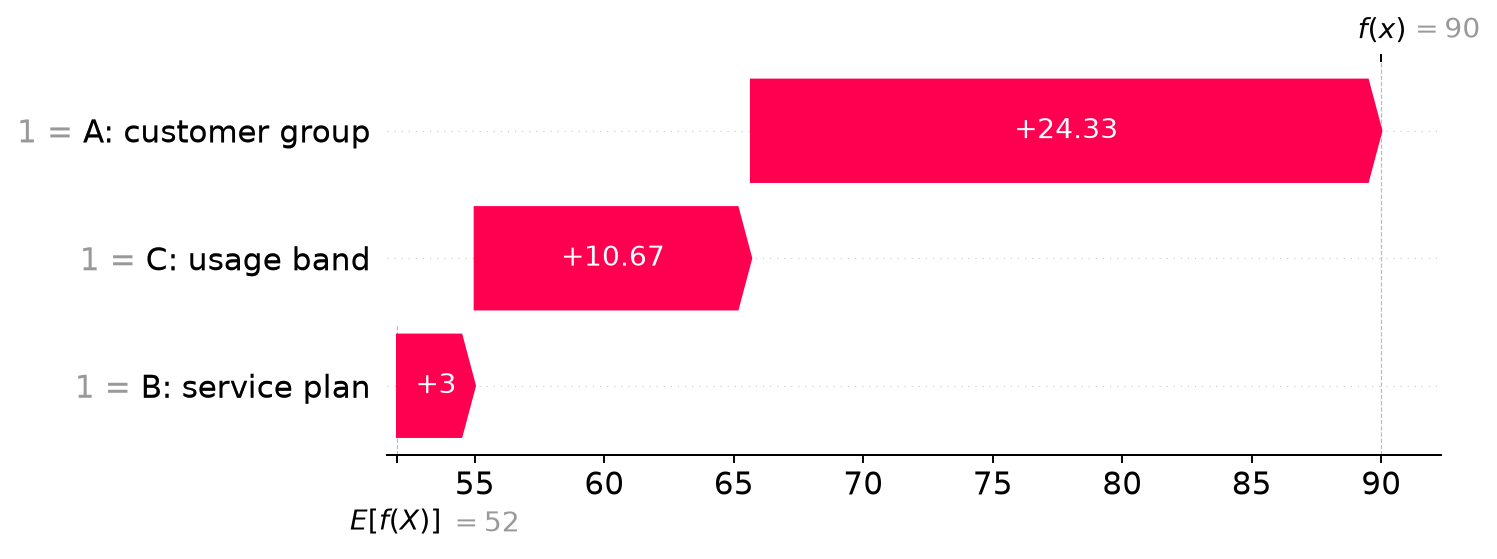
The explanation we will calculate next
+ customer group $24⅓
+ plan $3
+ usage $10⅔
= Maya’s prediction $90.
The three contributions add to the extra $38. The next chapter works through every reveal order to show exactly where $24⅓, $3, and $10⅔ come from.
A continuous route through the series
Read the next chapters in order for the derivation. If you already understand the algorithm, Part 7 contains a complete runnable example and the verification results.
- TreeSHAP: Start with One Small Tree — Start with ten dummy customers, build the tree’s predictions from their spending, and explain Maya’s $90 prediction.
- Calculate Tree SHAP Values by Hand — Work through all eight feature groups and all six reveal orders, including a feature outside the prediction path.
- How TreeSHAP Avoids Listing Every Feature Group — Follow Maya’s prediction from leaf weights to the TreeSHAP recurrence, repeated splits, and tree sums.
- Choose What a Hidden Feature Means — Keep Maya and the tree fixed while comparing stored branch counts with replacement from the same ten customers.
- Use TreeExplainer and Verify the Result — Run TreeExplainer on Maya and the original tree, then verify the baseline, prediction, and each feature contribution.
The algorithmic reference is Lundberg, Erion, and Lee’s Tree SHAP paper. The examples and figures here are original calculations; the downloadable scripts compare them with SHAP’s TreeExplainer. Start with the next chapter to see where every contribution comes from.